
How Salesforce handles Null and Empty Strings - a Hands-On Guide
Understand how Salesforce treats NULL versus empty strings, with quick experiments in the Developer Console.

This may be considered for some a basic topic when it comes to Salesforce development, but it’s very helpful to understand the differences between NULL and EMPTY strings in Salesforce.
Our science teachers have taught us that the best way to learn something is by experimenting it, right? So, let’s open Force.com Developer Console and see what happens when we start playing around with some String variables.
/*********************************
 Imagine three strings:
     - one with a single space
     - one null
     - one not empty and not null
*********************************/

String singleSpaceString = ' ';
String nullString = null;
String notEmptyString = 'Samwise Gamgee is the real hero';
// because, let's be honest...

// Now let's concatenate these strings to see
// what Salesforce is doing under the hood:
String concatenatedText =
    singleSpaceString + nullString + notEmptyString;

// This is the result:
// |DEBUG|concatenatedText:  nullSamwise Gamgee is the real hero

// What if we concatenate the empty and null variables only?
concatenatedText = singleSpaceString + nullString;

// This is the result:
// |DEBUG|concatenatedText:  null
Interesting, right? Salesforce, as expected, treats Empty and Null strings differently. When concatenating a null variable, it actually converts it to a string with a value equal to ‘null’, a text content.
So, how can we verify if a given string variable is null or empty? I’m glad you asked!
Let’s check the official Salesforce’s documentation for Strings:
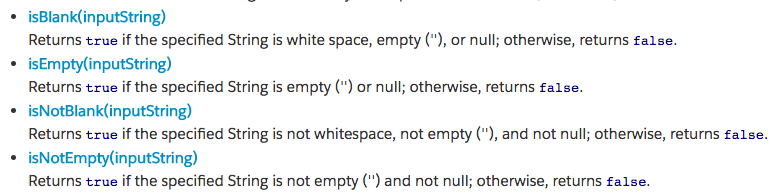
Using the methods isBlank() and isEmpty(), we can add the right statements into our logic, according to each situation.
The concatenated string is not empty because the method isEmpty() takes in consideration the single space (‘ ‘) from the variable singleSpaceString. However, the method isBlank() correctly considers this variable as a blank string.
Now you understand these differences and you’ll be able to know when to use one or another. If necessary, please save this article for your future reference.
See you next time.